4.6. Well Schematics
4.6.1. Description
Comprehensive tool for creating, visualizing, and managing detailed well schematics diagrams for well integrity management.
4.6.2. Schematics components
4.6.2.1. Tubulars
Casing — Pipe cemented in the wellbore (conductor, surface, intermediate); can be tapered. Defines top/bottom depth, OD/ID, and optional openhole.
Tubing — Production conduit inside casing; can include an ESP interval.
Liner — Casing that does not extend to surface. Same depth/OD/ID as other tubulars.
Options: Type: Casing | Tubing | Liner. Casing can be tapered (two segments). Hanger seal: Single Seal Hanger | Double Seal Hanger.
4.6.2.2. Fluids
Inner fluids — Fluids inside a tubular. Defined by type, location, and depth interval (top–bottom).
Annulus fluids — Fluids in the ring between two tubulars; use location “Outside”.
Options: Fluid type: Brine | Oil | Mud | Gas | Water | Air | N2 | Empty. Location: Inside | Outside.
4.6.2.3. Cements
Cement — Cement in the wellbore (inside or outside a tubular). Defined by type, location, and depth interval.
Options: Cement type: Standard | Foamed | Lightweight | Ultra-Lightweight. Location: Inside | Outside.
4.6.2.4. Packers
Packer — Seals the annulus at a depth interval. Placed within a tubular unit.
Options: Packer type: Standard | Mechanical | Retrievable | Permanent | Inflatable | Hydraulic | Compression | Tension.
4.6.2.5. Plugs
Plug — Blocks the bore at a depth. Placed within a tubular unit.
Options: Plug type: Cement | Bridge | Mechanical.
4.6.2.6. Screens
Screen — Completion screen over a depth interval (e.g. for sand control). Placed within a tubular unit.
Options: Screen type: Wire Wrap | Slotted | Perforated | Mesh.
4.6.2.7. General (layout and figure)
Layout mode: Uniform | Depth Transformed (Uniform: fixed width; Depth Transformed: scale by depth).
Uniform Width — Tubular Width.
Uniform Spacing — Annular Space.
Figure Size Width — Figure Width.
Figure Size Height — Figure height.
4.6.2.8. Wellhead
Enable Wellhead Valves — Toggle to show/hide wellhead valves on the schematic.
A-Ring, B-Ring, C-Ring, D-Ring — For each ring: Enable ring; Include Left Valves; Include Right Valves. Controls which annulus valves are drawn at the wellhead.
4.6.2.9. Xmas Tree
Enable X-mas Tree — Toggle to show/hide the Christmas tree on the schematic.
Options: Lower Master Valve | Upper Master Valve | Swab Valve | Wing Valves | Left Wing Valve | Right Wing Valve. Each can be included or excluded in the drawn tree.
4.6.3. Workflow (per Well Schematics app)
- Select well — Choose Well Name from the dropdown (well list is loaded from the project).

Create or load a schematic * Create New — Click Create New. Choose a template (Simple Well, Standard Well, Double Skin, or Create from Scratch). The form opens with template data or empty. * Load existing — Select a saved schematic from the dropdown and click Load Selected to load it into the form.
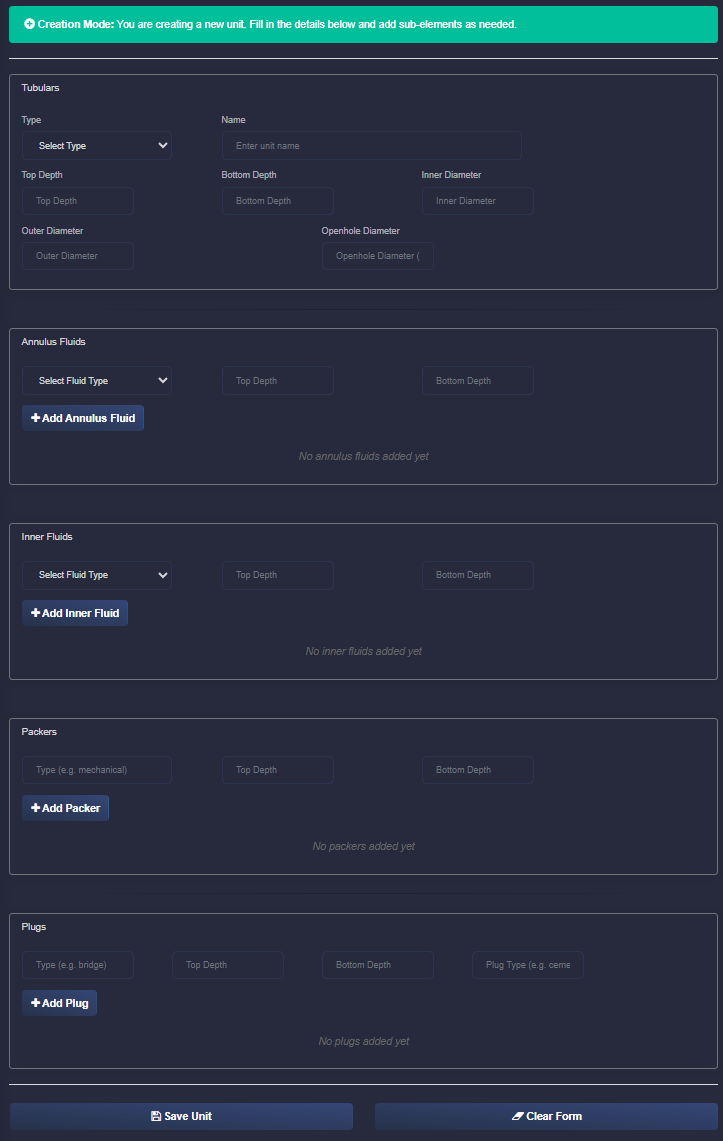
Define units * Create New Unit — Click Create New Unit. Fill the Tubulars tab (type, name, depths, OD/ID, optional openhole, draw shoe, hanger seal; for tubing, optional ESP). Add Fluids, Cements, Packers, Plugs, or Screens in their tabs. Set General (layout, figure size), Wellhead, and Xmas Tree if needed. Click Save Unit. * Edit unit — In the unit list, select a unit, then click Edit Selected Unit. Change fields and sub-elements as needed. Click Save Changes to keep, Delete to remove the unit, or Cancel Edit to discard.
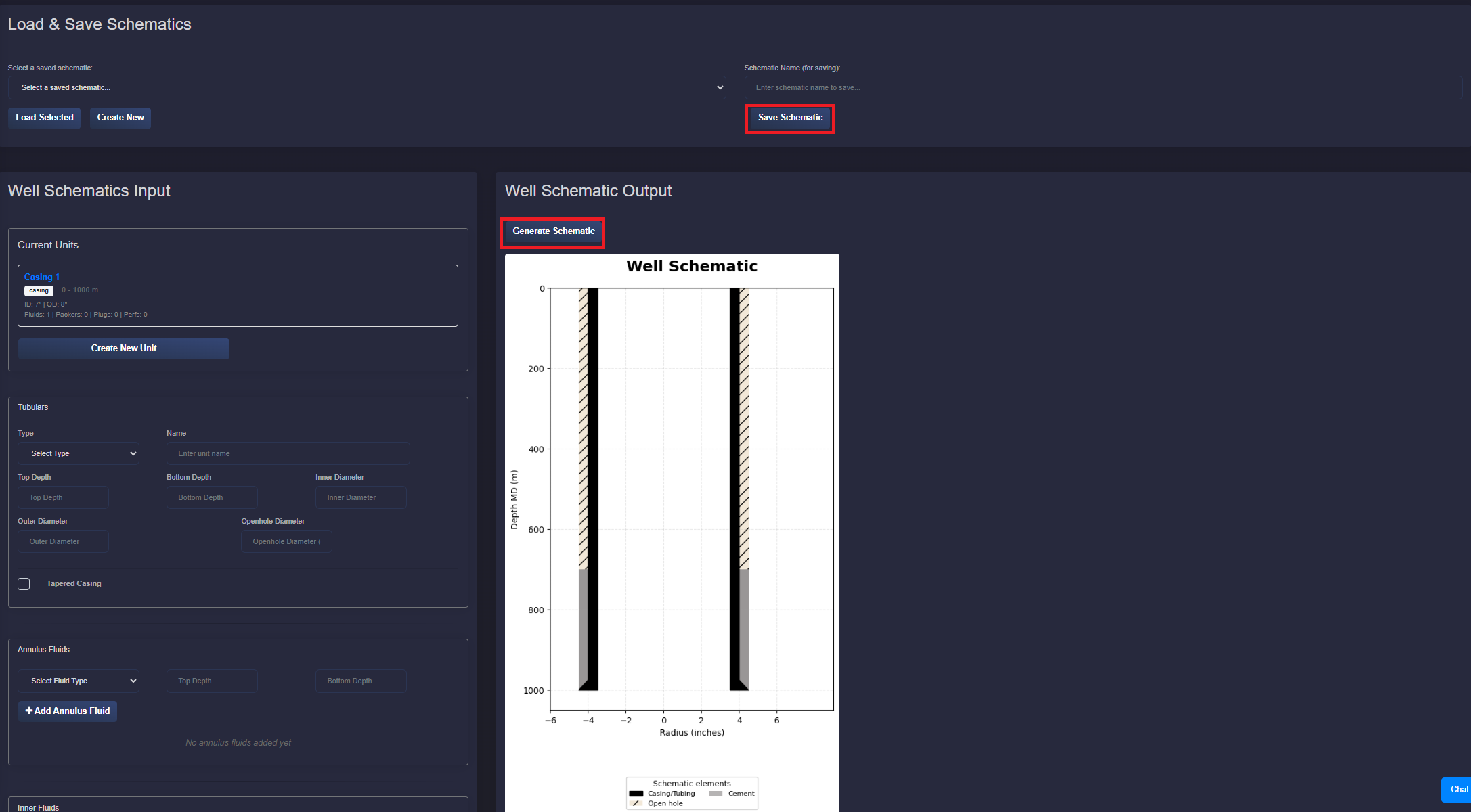
Preview — Click Generate Schematic to draw the diagram in the schematic output card.
Save schematic — Enter a Schematic Name and click Save Schematic to save to the server for the selected well.
Optional — Use Generate JSON to view or copy the schematic JSON. Annulus and Pressure Barrier Elements are derived from tubular and fluid data and can be passed to the Well Integrity application.